

Download HyperTerminal Private Edition – terminal emulator, serial communication, telnet, ssh, modem, com port, tcp/ip, legacy systems, command line, network connectivity, remote access, device management, system administration, industrial automation, network troubleshooting
Overview
HyperTerminal Private Edition is a specialized terminal emulation program designed for advanced users requiring robust connectivity across diverse communication channels. The application supports TCP/IP networks, dial-up modems, and serial COM ports, enabling seamless interaction with legacy systems, industrial devices, and remote servers. Its primary purpose is to serve as a reliable bridge between modern computing environments and older infrastructure that relies on terminal-based protocols such as Telnet and SSH. This makes it particularly valuable in fields like system administration, industrial automation, and network troubleshooting, where direct access to command-line interfaces remains essential.
The software targets technical professionals, network engineers, and IT administrators who manage equipment requiring serial or remote terminal access. It is especially useful in environments where compatibility with older systems is critical, such as in manufacturing plants, telecommunications infrastructure, or embedded device testing. The developer, Hilgraeve, is known for creating niche tools tailored to technical workflows, though specific background details were not provided. Real-world use cases include configuring network routers, managing programmable logic controllers (PLCs), and establishing secure connections to remote servers via secure shell protocols.
Within the broader app ecosystem, HyperTerminal Private Edition fills a vital gap by offering a feature-rich alternative to built-in terminal tools. Its ability to handle multiple connection types and emulate various terminal standards ensures continued relevance in technical workflows where standard utilities fall short. The app’s focus on stability, customization, and legacy compatibility underscores its role as a dependable utility in specialized IT operations.
Key Features & Functionality
- Multiple Connectivity Options – Supports TCP/IP networks, dial-up modems, and serial COM ports, enabling users to connect to systems via Telnet, SSH, or direct serial communication. Ideal for accessing remote servers or configuring legacy hardware.
- Macro Support and Keystroke Customization – Allows users to define macros, save sequences of keystrokes, and assign custom commands to keys. This streamlines repetitive tasks such as login procedures or system diagnostics.
- Adjustable Terminal Screen Size and Colors – Offers customizable display settings, including rows, columns, and color schemes, to optimize readability and compatibility with host systems that support terminal size adjustments.
- Advanced Configuration Features – Includes password and user ID assignment to single keys, pass-through printing, multi-session support, automatic exit settings, and ZModem crash recovery for uninterrupted file transfers.
- Wide Range of Terminal Emulators – Supports ANSI, ANSIW, Minitel, ViewData, and multiple VT emulations (VT100, VT100J, VT52, VT220, VT320), ensuring compatibility with a broad range of legacy systems and industrial devices.
For example, a network engineer can use the macro feature to automate login sequences across multiple routers, while an industrial technician might leverage serial COM port support to configure a PLC using VT100 emulation. The ability to assign host commands to single keys enhances efficiency in high-frequency operations. These features collectively reduce manual input errors and accelerate workflow execution in demanding technical environments.
Interface, UX & Performance
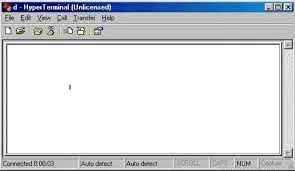
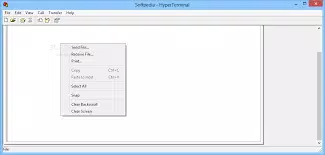
HyperTerminal Private Edition presents a classic terminal interface with a focus on functionality over visual flair. The layout is structured around a central terminal window, flanked by configuration panels and session management tools. Navigation is straightforward, relying on menu-driven access and keyboard shortcuts, which aligns with the expectations of experienced users. The interface supports customizable color schemes and font sizes, contributing to improved visibility during extended sessions.
Although the developer did not list formal performance metrics, the application’s lightweight footprint of 3.2 MB suggests efficient resource usage. It is designed to operate reliably across various Windows hardware configurations, including older systems. Responsiveness appears consistent, particularly during serial communication and SSH sessions. Stability is a core strength, with features like ZModem crash recovery helping maintain session integrity during unexpected disconnections.
Users engaging in prolonged sessions may appreciate the clean, distraction-free environment and the ability to manage multiple connections simultaneously. However, the interface may feel outdated to users accustomed to modern graphical applications. Despite this, its simplicity and reliability make it well-suited for technical workflows where speed and consistency are prioritized over aesthetics.
Platform Compatibility & Technical Requirements
HyperTerminal Private Edition is available exclusively for the Windows platform. The current version is 1.0.0.1, with a file size of 3.2 MB. The application is designed to run on Windows operating systems, though specific minimum OS requirements were not listed. Compatibility information was not fully disclosed, so users should verify system compatibility based on their environment.
Given the app’s size and nature, it is likely optimized for both modern and legacy Windows systems. The absence of detailed technical specifications means users should exercise caution when deploying on unsupported or outdated configurations. The lack of mobile or cross-platform availability indicates a desktop-focused use case, reinforcing its role as a specialized tool for Windows-based technical operations.
Pros and Cons
Pros
- Supports multiple connection types: TCP/IP, dial-up, and serial COM ports
- Extensive terminal emulator compatibility, including VT100, VT220, and VT320
- Advanced features like macro support, keystroke customization, and pass-through printing
- Lightweight at 3.2 MB, ensuring low system resource consumption
- Designed for reliability in mission-critical technical environments
Cons
- No information provided on minimum OS or hardware requirements
- Interface may appear outdated to new or casual users
- Exclusive to Windows; no support for Android, iOS, or other platforms
- Price point of $99.00 may be high for occasional users
- Limited documentation or support details were not disclosed
FAQ
Is HyperTerminal Private Edition available for mobile devices?
Currently, HyperTerminal Private Edition is only available for the Windows platform. There is no official mobile version for Android or iOS.
Can I use HyperTerminal Private Edition for SSH connections?
Yes, the application supports Secure Shell (SSH) connections as part of its TCP/IP network communication capabilities.
Does the app support serial port communication?
Yes, HyperTerminal Private Edition includes full support for serial COM port connections, making it suitable for direct communication with hardware devices.
What is the cost of HyperTerminal Private Edition?
The app is priced at $99.00. This reflects its specialized functionality and advanced features tailored for technical professionals.
Is the software regularly updated?
The developer did not provide information about update frequency. Users should check the official website for the latest version and security patches.
Final Thoughts
HyperTerminal Private Edition stands out as a powerful, no-frills terminal emulator tailored for professionals who require deep connectivity and control over legacy and remote systems. Its support for multiple protocols, extensive terminal emulation, and advanced automation features make it a dependable tool in system administration, industrial automation, and network troubleshooting. While the interface may lack modern polish and the price point is steep for casual users, its reliability and feature depth justify its value for technical teams.
For IT administrators, network engineers, and industrial technicians, this app offers a secure, efficient way to manage critical infrastructure. Its lightweight design and robust functionality ensure it remains a relevant utility in environments where standard tools fall short.
Download HyperTerminal Private Edition now


